
How to convert Notes NSF databases to PDF or HTML
The short answer: it depends on what's in the NSF.
If it's a mail file and you just need the messages as PDFs, a mail converter will do the job. If it's a Notes application, such as a contracts database, an HR system or a document library, you need a tool that converts the whole application. That means every document, the views people use to find them, the forms that lay them out, the attachments, and the doclinks between them.
Teamstudio Export does that. It's a stand-alone Windows application that runs on a workstation with HCL Notes installed. It reads your databases and turns them into PDF files, a self-contained HTML website, SharePoint lists or CSV. Once the data is out, you can shut down your Domino servers.
Why one-file converters fall short for applications
Search for "NSF to PDF" and you'll find plenty of low-cost converters. Most are built for mail. They treat an NSF as a mailbox of emails, contacts and calendar entries, and they work well for that.
A Notes application is different. Its value is in the structure: categorized views, forms with computed fields, response documents, rich text, and doclinks that tie one document to another. Flatten that into a pile of separate PDFs and people lose the way they used to find things.
Scale matters too. Most organizations retiring Domino have dozens or hundreds of databases, not one. Converting them one file at a time isn't a plan.
What Teamstudio Export converts
Export works in two steps. First it reads each Notes database into an open, documented XML format that captures field data, rich text with its formatting, file attachments and the database design. Then it builds your output from that XML.
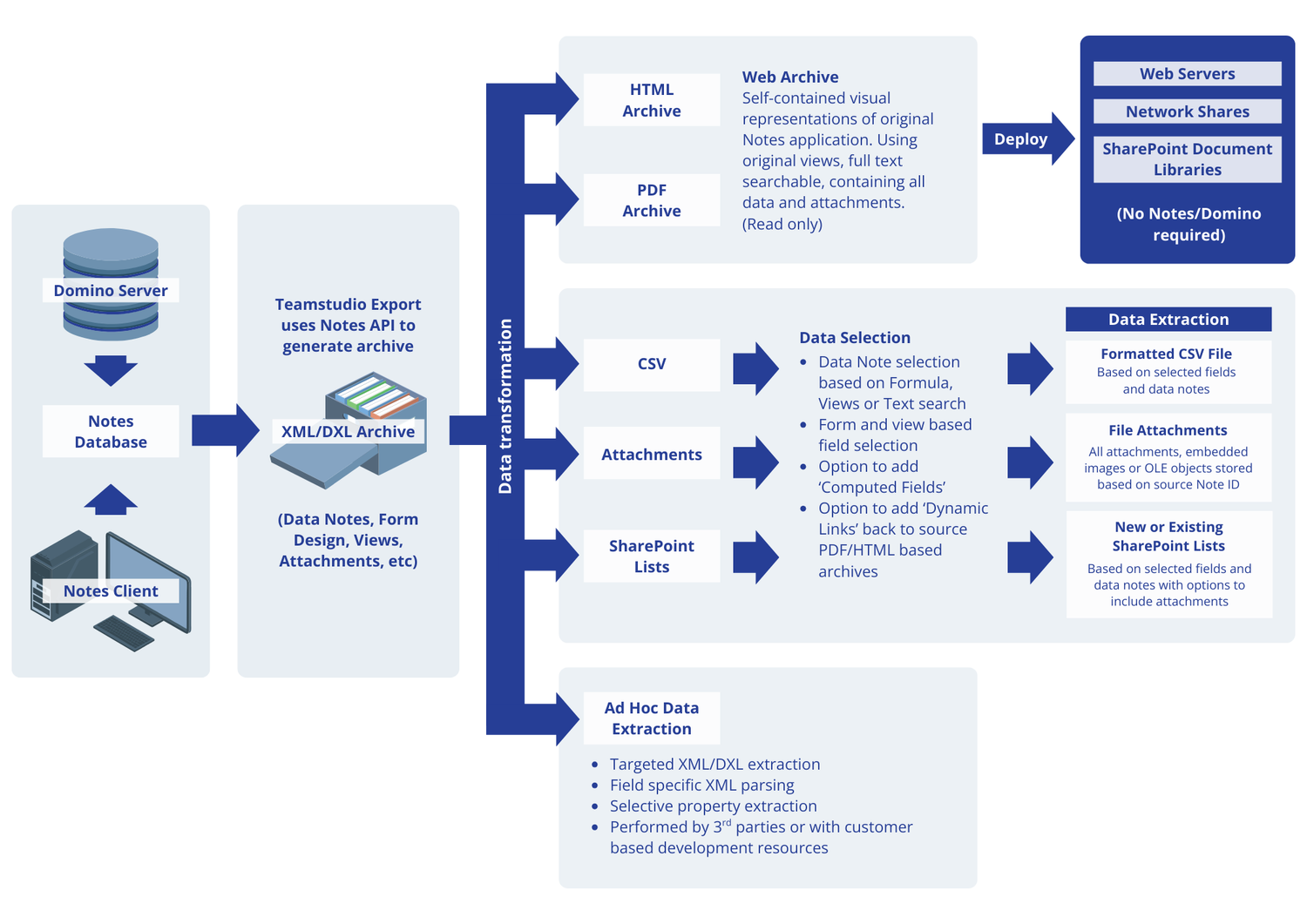
How Export works: your Notes data goes into an XML archive, then out to the formats you choose.
Here's what comes across:
- Documents and rich text: every document you select, with rich text and formatting kept.
- Views: all views are reproduced, including categorized views. You can hide any you don't want users to see.
- Forms: documents are shown the way they looked in the Notes client, laid out by the original form.
- Attachments: files stay with their documents and can be downloaded and opened.
- Doclinks: links between documents keep working in both PDF and HTML. Links to another database work too, as long as that database is converted as well. See how Export keeps doclinks working.
You can convert a whole database or pick documents with a Notes selection formula, a full-text search, or one of the application's own views. And you can select many databases at once. Export queues the work and runs it in the background, three tasks at a time. There's no limit on the number of databases or the amount of data.
Some design elements don't carry over to HTML: navigators, outlines, framesets, pages, agents and script libraries. Forms that rely on LotusScript or JavaScript may not display exactly as they did in Notes. The data itself is all there.
PDF or HTML?
Pick the format that fits where the data is going next.
- HTML: Export builds a self-contained, read-only website for each database, with the original views and forms. It's full-text searchable, so users find what they need without a Notes client. No web server is needed: copy the folder to a file share or web server and open it in any modern browser.
- PDF: Export writes each document as its own PDF, ready to load into your content management system or document library.
- SharePoint and CSV: if the data is moving into Microsoft 365 or another system, Export can load it straight into SharePoint lists or write CSV files.
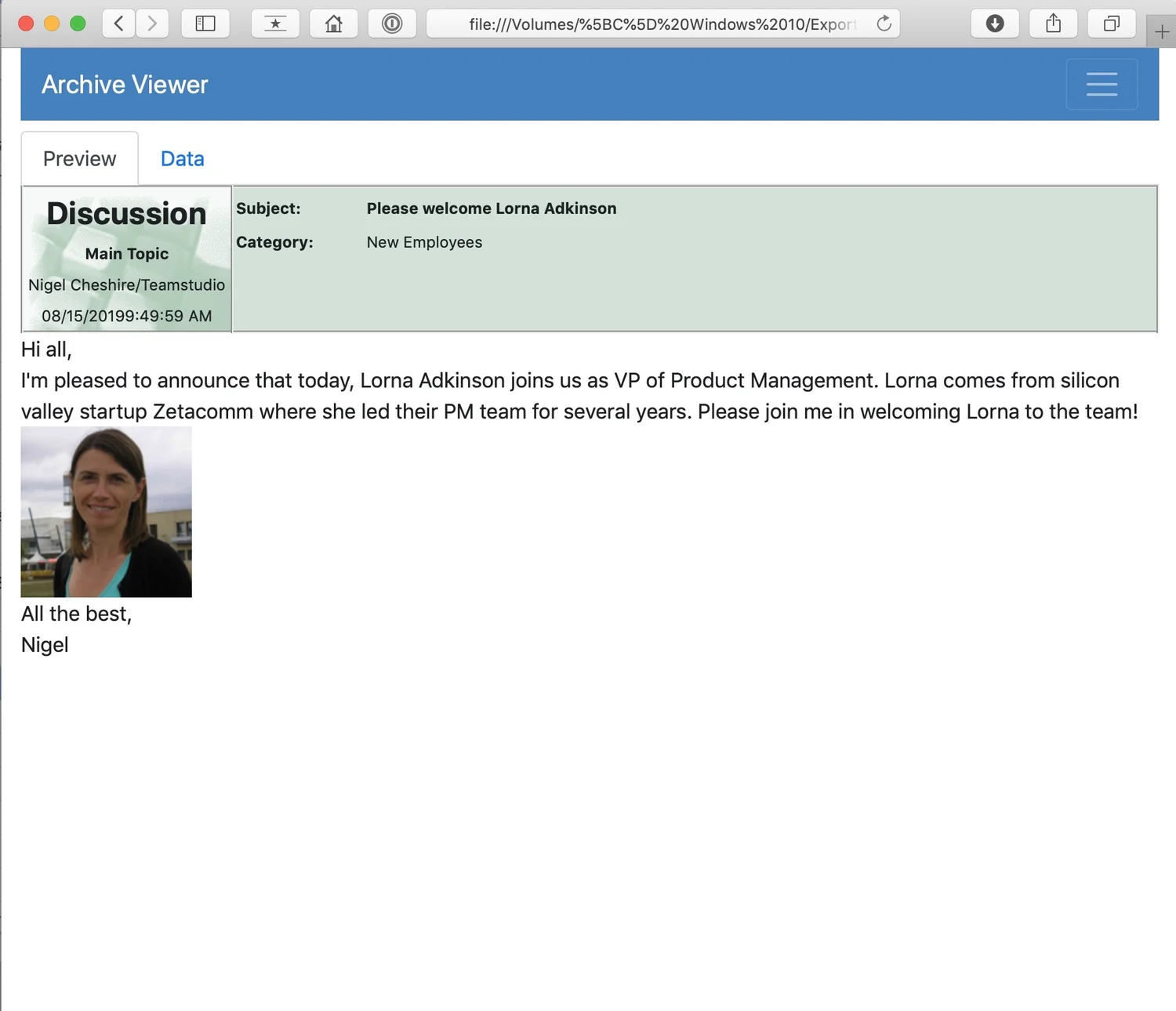
A Notes document in an HTML archive, open in an ordinary browser.
You don't have to pick just one. You might use HTML for the applications people still look things up in, PDF for records that belong in the company's document system.
Either way, nothing is left running on Domino.
How Export licensing works
Export is licensed per workstation, as an annual subscription. You need the license while you're converting your databases. Once the last one is done, you don't need it any more.
The finished archives carry no runtime license. Nobody needs Export, Notes or Domino to open them, and you can share them with as many people as you like, for as long as you need them, at no extra cost. So moving off Domino with Export is a one-off project cost rather than another bill that renews every year.
Frequently asked questions
Can I convert a Lotus Notes NSF file to PDF? Yes. Teamstudio Export converts Notes databases to PDF, writing each document as its own PDF file. It's built for whole Notes applications, and it can convert many databases in one run.
Can I convert an NSF database to HTML? Yes. Export turns each database into a self-contained, read-only HTML website that keeps the original views and forms and is full-text searchable. You open it in any modern browser, with no Notes client or web server.
Do I need HCL Notes installed? You need HCL Notes on the Windows workstation that runs Export, plus a Notes ID with access to the databases. The people who use the converted PDF or HTML files don't need Notes at all.
Will doclinks still work? Yes. Doclinks keep working in both PDF and HTML. For links that point to another database, convert that database too. Here's how to get external doclinks right.
Are attachments included? Yes. Attachments stay with their documents and can be downloaded and opened. In HTML archives, the full-text search covers document text but not the text inside attachments.
Can I convert hundreds of databases? Yes. You can select many databases at once and Export queues them, running three tasks at a time. There's no limit on the number of databases or the amount of data.
Can I shut down Domino afterwards? Yes. Once your data is converted, the PDF and HTML output doesn't depend on Domino, so you can decommission your servers.
Do I have to keep paying for Export after the migration? No. You need an Export license while you're converting your databases. Once they're all done, you can let it go. The PDF and HTML archives have no runtime license, so anyone can keep using them at no extra cost.
Can I try it first? Yes. You can download a trial of Teamstudio Export with no forms to fill out and no time limit.