

What's New?
Building on the data export capabilities we introduced in Export 5.0, version 5.1 is now available, and it answers a question we heard from teams almost as soon as they started using the configurable field selection capabilities while exporting their datasets: do I really have to set all of this up again every time?
From this release, the answer is no. Alongside that headline improvement, 5.1 brings a modernized technical foundation and a change to how we sign our software that's worth a minute of your attention before you install. As always, this update is a free upgrade for customers with a valid license.
Save and reload your data selection criteria
The data export feature introduced in 5.0 let you target exactly the documents and fields you wanted, by selection formula, by view, or by full-text search. Now you can save that configuration and load it straight back in.
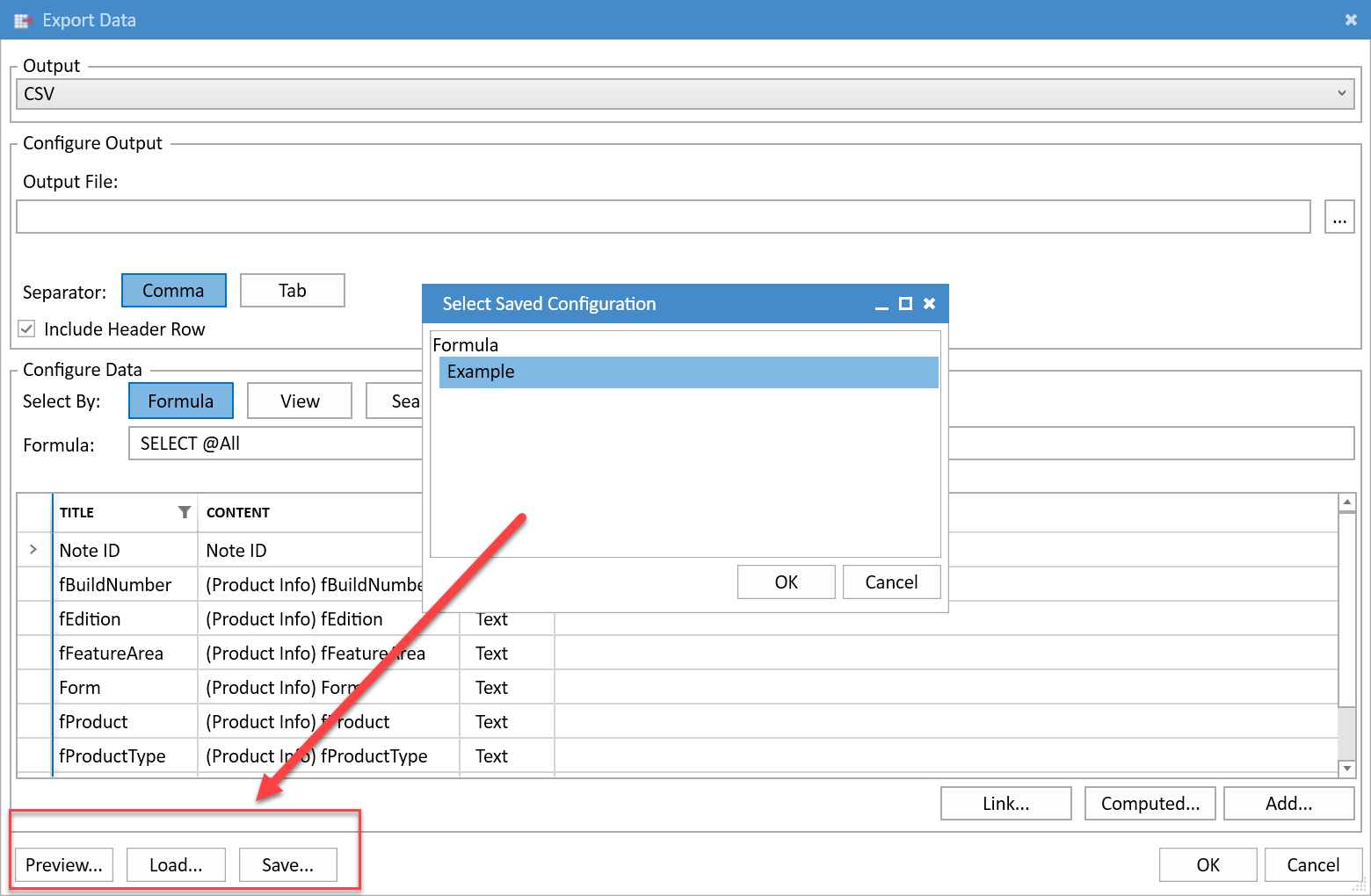
The new Save and Load buttons in the Export Data dialog let you store a complete data selection and column configuration, then recall it instantly for future exports.
Your saved criteria capture both the selection itself (formula, view, or search) and the full list of columns you chose to export. For recurring archive jobs, periodic compliance pulls, or any data export you run more than once, that means no more rebuilding the same configuration from scratch. Set it up once, reuse it on demand, and get consistent output every time.
A modern foundation: Export now runs on .NET 10
Export 5.1 moves off the older .NET Framework used in every previous version and onto .NET 10. We now bundle a local .NET runtime directly with Export rather than depending on a shared installation on the machine. The download and install footprint is a little larger as a result, but the trade-off pays off in three ways:
Simplified deployment: No more subtle bugs caused by differences between user-installed .NET Framework versions across your environment.
Cutting-edge security: Export can take advantage of the newest, most secure .NET features.
Easier maintenance: If a vulnerability is ever found in .NET or a third-party library, updating Export becomes far more straightforward.
A heads-up on our new code signing
We've also moved our code signing to Microsoft Artifact Signing, which uses short-lived certificates valid for just three days. One consequence is worth flagging so it doesn't catch you off guard: it is normal and expected for the signing certificate to appear expired by the time you install Export.
That is by design and your installation is still fully valid. Every signature is securely timestamped at the exact moment of signing, so as long as the certificate was valid when the product was signed, which it was, the signature remains valid. Expiring the certificates quickly simply ensures they can't be misused if they ever fall into the wrong hands.
Anything else?
Yes, 5.1 also includes a round of fixes and smaller improvements, including support for @While, archiving of views that are hidden from the client, support for the Visio.Drawing.5 OLE type, and more robust handling of corrupt Base64 attachments and OLE objects. You can review the complete list in the full release notes.
Where Can I Find It?
Customers with a valid license can download the latest version of Teamstudio Export from our download page.
If you're evaluating Export, you can learn more about the product on our website or get in touch with our team through our contact page.
We've also updated the product documentation, including the data export guide and the release notes.
How to Install or Upgrade?
Upgrading to Export 5.1 is straightforward:
Uninstall your existing version of Teamstudio Export using the Windows add/remove programs control panel.
Download and install version 5.1 from our download page.
Your existing settings are retained, and your XML archives need no modification, simply run a new export to HTML or PDF to pick up the enhancements in 5.1.
New to Export? Have your serial keys handy during installation, and refer to our installation guide for system requirements and step-by-step instructions.
If you run into any technical issues during your upgrade, please get in touch with our support team.
We appreciate the feedback and suggestions that shaped this release. As always, if you have any questions or would like to arrange a demo, please reach out, we're happy to help.