
Over the past few months we've had an interesting shift in the conversations we're having with customers. Alongside the usual questions about archiving sequences, PDF rendering, and SharePoint deployment, a new topic has started coming up with increasing regularity: AI.
More specifically, customers are asking how they can get their exported Notes data into AI-backed systems, and in particular, into what's commonly known as a RAG pipeline. We've had several conversations along these lines in recent months, ranging from customers who have a fairly specific setup in mind already, to others who are at the "we know we want to do something with this data, we're just not sure what yet" stage.
And although this isn’t our exact domain, Teamstudio's expertise is in getting your Notes and Domino data out cleanly, faithfully, and into open formats. What happens next with that data is increasingly something customers are figuring out for themselves, often in creative ways. And that's exactly why we're writing this post. We want to know what you're doing.
First, a quick explainer on RAG
For those not yet down this particular rabbit hole: RAG stands for Retrieval-Augmented Generation. It's a way of connecting a large language model (like GPT-4, Google's Gemini, or others) to your own data, so that when you ask it a question, it retrieves relevant content from your dataset before generating an answer. The result is an AI assistant that can reason over your specific documents and knowledge, rather than just its general training data.
For organisations sitting on decades of Notes data, internal knowledge bases, procedural documents, project records, the appeal is obvious. That data has real value. RAG is one way to make it accessible and queryable in a way that a static archive simply isn't.
What format should you export in?
This is one of the first practical questions that comes up, and the honest answer is: it probably depends on your data.
Teamstudio Export can produce several output formats, and they're not all equally suited to a RAG pipeline. Here's our thinking, though we'd genuinely welcome input from anyone who has tried this:
CSV: works well for structured application data, think databases with consistent field structures, where each document maps cleanly to a row. Most RAG pipeline tools can ingest tabular data relatively easily, and the clean field separation makes chunking and embedding straightforward.
HTML: is probably the most practical format for unstructured rich text content, knowledge bases, procedural documents, anything where the narrative content is what matters. Most pipeline tools can parse HTML, and the structure of the Export HTML output (one document per page, consistent layout) lends itself reasonably well to document-level chunking.
PDF: is workable, but adds an extraction step. Most RAG tools can ingest PDFs, but text extraction from PDF isn't always clean, particularly for complex Notes layouts, so it may introduce more noise than HTML would.
DXL/XML: is the most complete and faithful representation of the source data, but it requires more processing work to get into a pipeline. Unless you have engineering resource to write a custom parser, it's probably not the easiest starting point.
SharePoint List: may be useful if your pipeline originates from SharePoint, but as a direct RAG input it's a less natural fit.
Our instinct is that for most customers, HTML or CSV will be the practical starting point, and we suspect the right answer depends heavily on what kind of data you're planning on exporting.
What about email?
A couple of customers have mentioned mail file exports in this context, and it's an interesting case. Companies do feed email archives into RAG systems, particularly where the goal is institutional knowledge recovery. If decades of decisions, agreements, and project context live in mail files, there's a real argument for making that searchable and queryable via AI.
That said, email is a noisy data source. The signal-to-noise ratio in a mail file is considerably lower than in a structured knowledge base, and there are real questions around privacy that need to be worked through before feeding mail data into any AI system. It's not a reason not to do it, but it's worth being aware of the challenges.
What might a pipeline look like?
We want to be clear that we're not prescribing an approach here, this is purely illustrative, and we'd love to hear what setups you're actually using. But for context, a fairly typical RAG pipeline might look something like this:
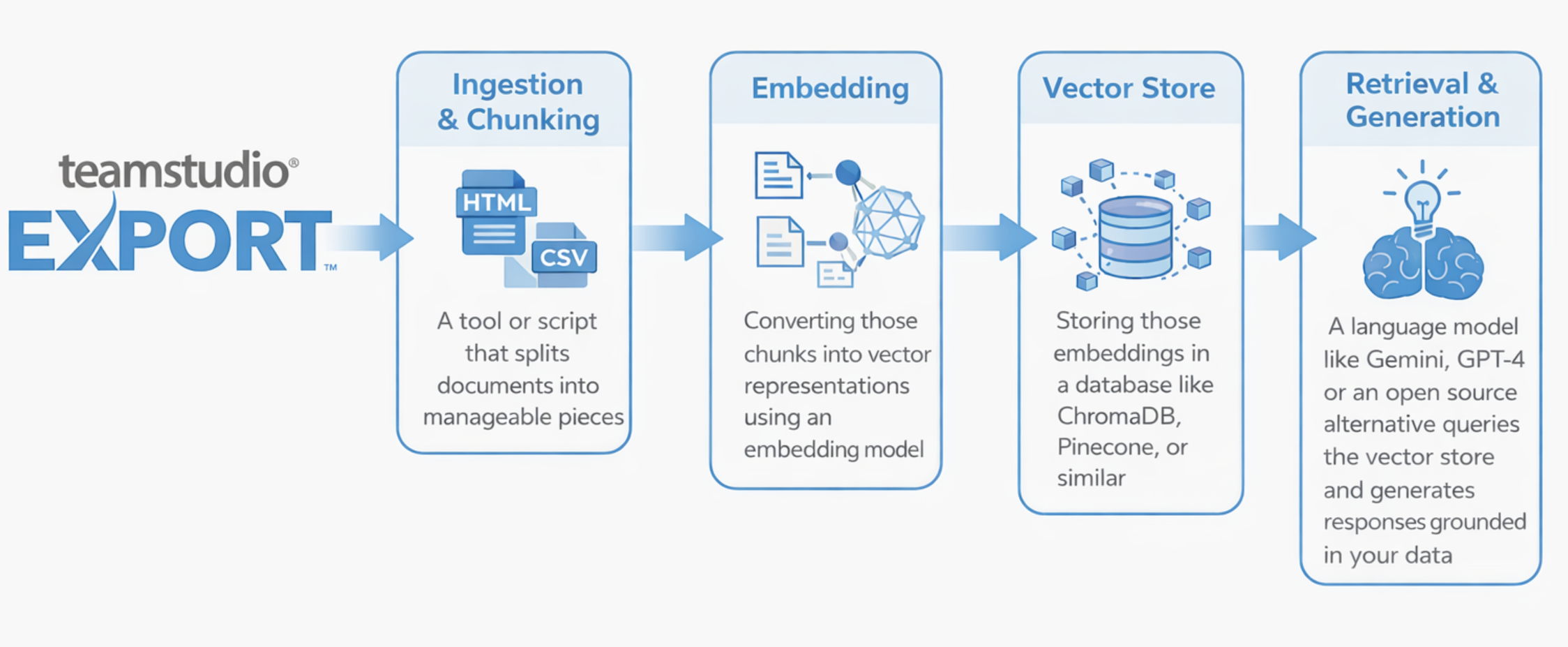
Tools like LangChain or LlamaIndex are commonly used to wire these stages together, but there are plenty of other approaches. Some customers may be using managed cloud services that handle much of this under the hood.
Again, this is an illustration, not a recommendation. Your setup will depend on your data, your infrastructure, and what you're actually trying to achieve.
The questions we're asking ourselves, and you
Here's what we're genuinely curious about:
1. What data are you exporting for AI use?
Mail files, knowledge bases, structured application data, or something else entirely? Knowing what types of Notes content customers are feeding into AI systems would help us understand where the real use cases are developing.
2. What output format are you starting with?
Are you working with our HTML output, CSV exports, raw DXL, or something else? And has the format caused any headaches downstream in the pipeline?
3. What does your pipeline or tech stack look like?
We're not expecting detailed architectural diagrams, even a rough sense of the tools involved (LangChain, Vertex AI, Azure OpenAI, a custom setup, a managed service) would be interesting to hear.
4. What are you actually trying to do with it?
Search and retrieval? A conversational interface over legacy content? Compliance querying? Something we haven't thought of? The use case shapes everything, and we suspect there's more variety out there than we've encountered so far.
5. What's been harder than expected?
Data quality? Chunking strategy? Getting the export into a format the pipeline can consume? We'd love to know where the friction is, not least because it might point to things we could do better on the Export side.
We'd love to hear from you
We're at an early stage of understanding of how customers are using exported Notes data in AI contexts, and we don't want to get ahead of ourselves. But the conversations are happening, and we'd like to be able to anticipate customers’ needs in future releases of Export.
If you're doing something interesting in this space, or even just experimenting, we've put together a short survey and would love to hear what you're up to: AI & RAG Survey.
As always, if you have any questions or would like to arrange a demo of Teamstudio Export, please reach out. We're happy to help.