

If your organization still runs Domino 9, 10 or 11, HCL gave you some extra time last year. In September 2025, HCL announced it was moving the final end date of Extended Support out to June 30, 2030.
For teams that couldn't upgrade in time, that's welcome news. It takes the pressure off making a rushed decision. But when a deadline moves, the project usually slows down with it. Four years feels like a long time, which is exactly why it's worth deciding now how you're going to use it.
The Reality of Extended Support
Extended Support is its own arrangement. You set it up separately through a statement of work with HCL, on top of Standard Support, and it's meant to keep existing environments running while an upgrade isn't yet possible. Check HCL's Extended Support overview for the exact terms that apply to your version.
Meanwhile, everything around those servers keeps changing: operating systems, browsers, security requirements, and the people who know how your applications were built. Every year you stay on an older release, the gap between where you are and where you need to end up gets wider.
Use the extra four years to do the job properly.
The Trap: The Same Estate, Four Years Older
We see the same pattern again and again. A deadline looms, a project gets scoped, and then the deadline shifts. The project drops down the priority list. When the new date arrives, the organization faces the same decision with the same long list of databases, older hardware, and fewer people who remember why half those applications exist.
The size of your estate is what drives the cost of every option. Whether you upgrade to Domino 14.5, migrate off the platform, or keep paying for Extended Support, the bill grows with how much you're carrying. Reduce the footprint now and every path forward gets cheaper.
Use the Time: Shrink First, Decide Later
You don't need to settle the upgrade-or-migrate question today to make real progress. In almost every Domino environment, the first steps are the same.
Find out what's actually being used. Most long-lived environments are full of databases nobody has opened in years. Teamstudio Usage tracks server activity to show you which applications are active, which have gone dormant, and which user IDs are sitting idle. Pull at least 12 months of data so an annual or year-end process doesn't get flagged as unused. Our post, Five Teamstudio Usage Reports for Domino Migration, Licensing and Compliance, covers the best reports to start with.
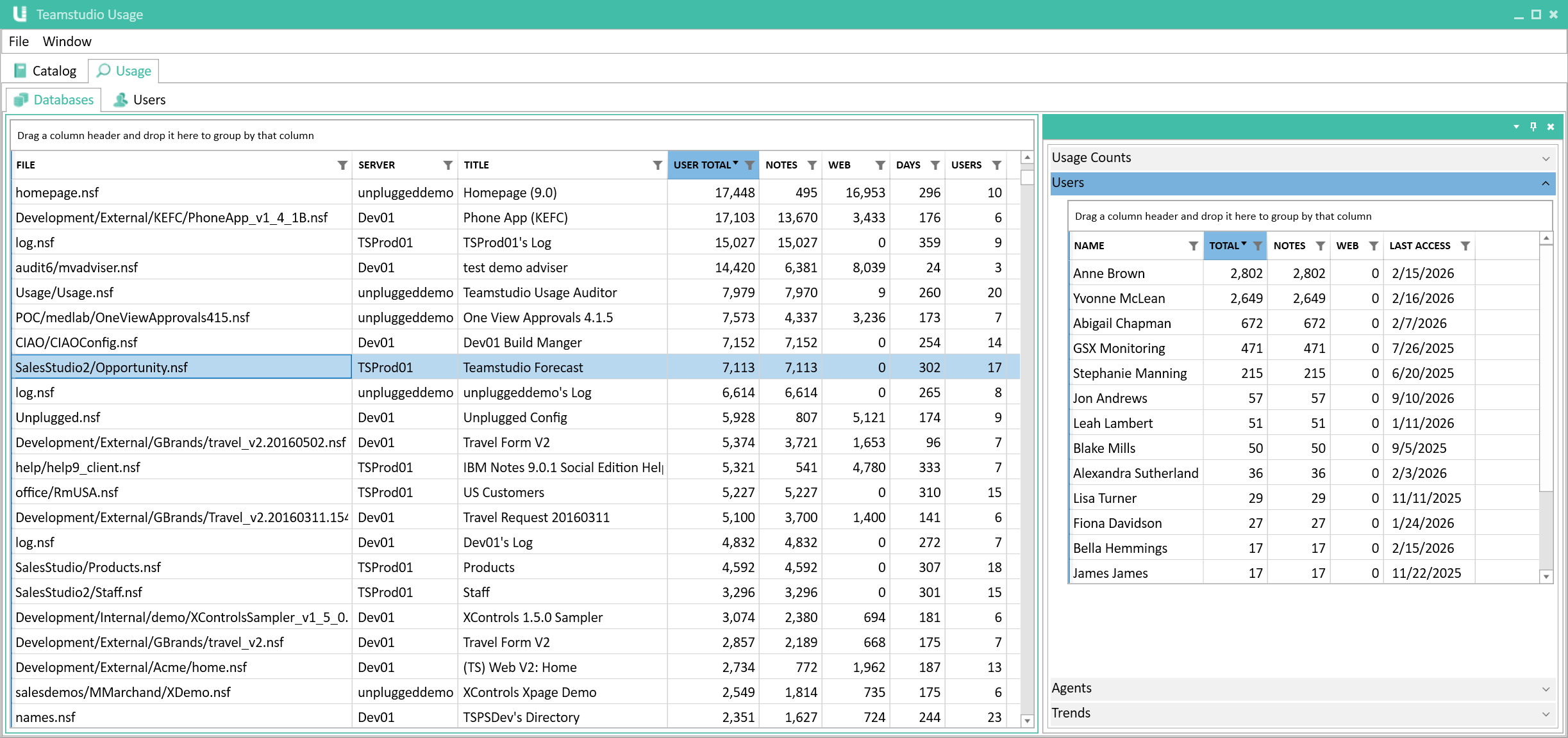
Usage shows which applications are still in use and which have gone quiet, so you can size the estate on real data.
Clean up inactive IDs. The same Usage data flags user IDs with no recent activity. Reclaiming them trims your licensing costs and reduces the number of users you'll eventually have to upgrade or migrate.
Archive what nobody uses. You can't just delete an unused database if you still need the records for compliance, legal holds, or the occasional "why did we decide that five years ago?" question. Teamstudio Export creates a complete XML archive of each database and generates a read-only, searchable HTML or PDF version that anyone can browse without a Notes client or a Domino server. Once a database is archived, you can take it off the server for good.
Make the big decision on a smaller footprint. With the dormant applications archived and retired, you're left with the core applications the business actually relies on. That's a much simpler list to evaluate, whether you're pricing a move to Domino 14.5 or a migration elsewhere. For whatever remains, Teamstudio Analyzer helps map out design complexity and shows you what each application is made of. It reads the design of a database or template and builds a separate analysis database with a detailed document for every element. From there, Analyzer’s audit feature and targeted filters can help flag the code most likely to break on a newer release. Use it to help build an actionable list of what needs fixing before users run into it, and a better sense of how much work each application will take.
Plan how the data will move. If you decide to leave Domino, rebuilding the applications is only half the job. The data inside them still has to go somewhere, and that’s where many migrations slow down. Rich text, file attachments and doclinks don’t map neatly onto a new platform. Teamstudio Export handles that part. It moves Notes data into open formats such as XML and SharePoint lists, keeps attachments and doclinks intact, and lets you save a configuration and run it again as you test. Try it on one or two of the applications you know are moving, and you’ll see what the output looks like long before you have to commit to a target platform.
Work Backwards From 2030
To stop the project drifting, treat June 2030 as the date you're finished, not the date you start. Leave a year at the end for the applications that take longer than expected; there are always a few. That puts discovery and archiving into the next 12 to 24 months, and you can begin that work now without committing to a long-term platform.
Every database you retire this year is one less you'll have to deal with later, whichever way you go. Use the time to shrink your Domino estate, and the decision you eventually face will be a much smaller one.
If you'd like to see how Usage and Export could fit into your plans, or would like to set up a demo, please reach out. We're happy to help.